Webhooks
Webhooks let you subscribe to events and receive real-time notifications when those specific events occur. (For example, payment processed, funds received into your account, or a client onboarded). Instead of polling the API for updates, webhooks push data to your endpoint as soon as the event happens, improving efficiency and reducing unnecessary API calls.
Advantages of using webhooks:
- Receive real-time updates
- Reduce API traffic and server load
- Sync the data as it changes
- Ensure timely and reliable updates
How do Webhooks work?
1
Register your Webhook URL
Provide a public, secure URL where your system can receive webhook notifications.
2
Subscribe to Events
Subscribe to events you want to receive (e.g., payment processed, client onboarded, etc.).
3
Event Triggered
An event you've subscribed to occurs in the Corpay system.
4
Webhook Notification Sent
Corpay sends an HTTP POST request with the event details to your registered webhook URL.
5
Process the Payload
Use the received webhook notifications to monitor specific events and sync the updates.
Sample Payload
 {
  "EventType": "PaymentAccepted",
  "CreatedDate": "2023-03-30T11:04:59.846784-04:00",
  "ClientCode": "{clientCode}",
  "Id": "{clientCode}-P5MBEP",
  "MessageId": "d2fa6482-c4c3-4a7a-9957-73ca1931143d"
}
When to use?
- Use REST APIs when you need to query data on demand.
- Use Webhooks when you need to be notified immediately when an event occurs to avoid constant polling.
Example: Tracking a payment
- Without Webhooks: You would need to poll
GET /api/payment-tracking/{trackerId}repeatedly. - With Webhooks: Subscribe to events like
PaymentProcessedorPaymentOnHold. Corpay will automatically send a POST request to your webhook endpoint when the event occurs.
Webhooks Security - Signature verification
To ensure secure communication, each webhook request includes a digital Corpay-Signature in the Header. You can use this signature to authenticate the payload and prevent man-in-the-middle (MITM) attacks.
- The header includes a Unix timestamp with an encrypted key in SHA1 cryptographic hash format, created using HMAC.
- You can verify the authenticity of the notification by decrypting this header with HMAC to confirm if it matches the key (shared during implementation).
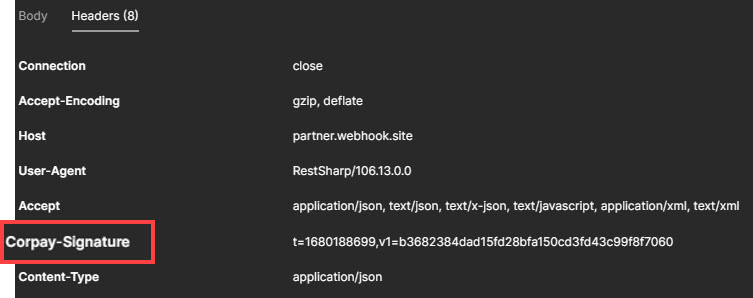
Verify v1 to authenticate the payload. The encryption method for v1 will be shared with you during implementation.
Please contact your account representative for instructions to decrypt or validate your signature.
What made this section unhelpful for you?

On this page
- Webhooks